The white hood at the bottom of the frame is our car. It slows almost to a stop as a group of cyclists crosses ahead. I wanted to find more clips where those two things happen at the same time.
From the car’s position data, I estimate that it slows from 9.6 to 1.1 m/s over these six seconds. Driving clips and stills throughout this article: Argoverse 2 Sensor Dataset, © 2021 Argo AI, LLC. Trimmed and resized. CC BY-NC-SA 4.0.
A filter like object_type = cyclist can find footage of a rider waiting at the curb. Without a reliable label for crossings, I have to look for the action in the footage itself. And timing matters. Say a cyclist crosses early in the clip and our car brakes for a red light near the end. That clip has both things I asked for, several seconds apart.
Choose the unit of search
If I’m looking for footage near a junction, an embedding for the whole clip will do. A crossing can be over in a few seconds, so I embed shorter windows and check the speed over the same stretch.
I start a six-second window every four seconds. In a 20-second clip, the last window starts at 16 seconds and runs to the end. The two-second overlap helps catch crossings that straddle a cut. It costs more vectors, and the same crossing can show up in two results.
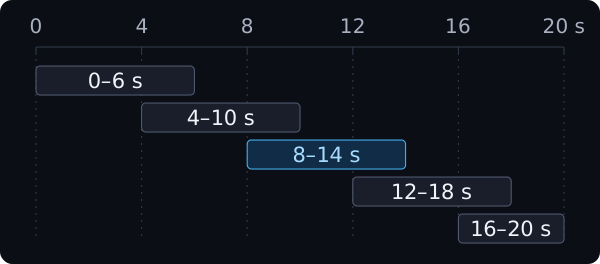
For each window, I sample eight frames and encode them together as one 256-dimensional vector. The model embeds the text query in the same space, so I can rank the windows by similarity. The motion field comes from the speed trace. I subtract the first valid speed sample from the last and divide by the time between those samples.
Keep conditions at the same granularity
I search for “Cyclists ride across the road ahead at a junction” and use a motion filter of ≤ −0.5 m/s² on our car’s net speed-change rate.
In the red-light example, the crossing might rank well in the first six seconds and the stop might pass the filter in the window from 12 to 18 seconds. Checking speed on the window I’m ranking keeps that later stop from counting as a match. If I want to know whether we started braking before the cyclist entered the lane, I still need to line up the footage with the timestamped speed trace.
Model the clip and its windows
A row per window makes sense if I need to re-embed or delete windows one at a time. With a separate clip record, the app follows the clip ID to find the video and coordinates updates that touch both records. For a city-specific query, it could look up the clips in that city first and limit the window search to those IDs.
I had a bounded set of windows per clip and managed them together. In my local Milvus 3.0.2 setup, I stored one entity per clip and put its windows in a StructArray called observations. Each window has the timestamps and motion data alongside its vector.
clip_idobservations[]StructArraywindow_idstart_s,end_swindow_vectormotion_availablenet_speed_change_mps2
window_idstart_s,end_swindow_vectormotion_availablenet_speed_change_mps2
I search observations[window_vector]. The element_filter limits the search to windows with a motion reading that passes the cutoff.
element_filter(
  observations,
  $[motion_available] == true
  and $[net_speed_change_mps2] <= -0.5
)
With either layout, I can keep the video in object storage. The app opens the media from its reference and seeks to the start of the match.
Return the match with its context
I screened 530 recordings using cyclist annotations and the car’s position data, then watched the candidate windows. The three clips are from different recordings. In each one, a rider crosses ahead and the car slows at an average rate of at least 0.5 m/s² over the window.
- Group at a stop line9.6 → 1.1 m/s
- Wide city intersection5.7 → 1.2 m/s
- Residential junction9.6 → 0.1 m/s
The numbers show the recording car’s estimated speed at the start and end of each six-second clip.
I’d use this same view for the vector search hits and include the clip ID and time range on each result. With both, a teammate can jump to the crossing and scrub back to see how the car approached it.
For a quick review, I’d group by clip ID and show the highest-ranked window from each clip. If I’m looking for several events in one drive, I’d keep the individual hits. Two clips can still contain the same encounter, so I’d check for duplicates during review.
Decide what to review next
Next I’d look for cyclists who come out from behind parked cars and keep some unobstructed crossings for comparison. If the same few encounters keep turning up, I’d ask the collection team for more routes with parking close to crossings.
I’d time how long it takes to build a shortlist and count how many distinct encounters make it through review. To check the search ranking, I’d have people judge which clips match each query. I’d test the vehicle separately on crossings it never saw during training.